Conditional probability
Translate “given that” correctly, distinguish independence from mutual exclusivity, and work through an exact examination-style example.
Read the H1 guideAn AI mathematics app catered specially to Singapore A-Level Math syllabuses for both students and teachers—H1, H2, Further Mathematics and H3. It reads students’ working, gives useful guidance, and equips teachers with tools for assignments, marking and learning insights.
Integrand starts from your attempt. It can interpret typed questions, handwritten working and uploaded material—then respond at the right level, from a small nudge to a complete explanation.
Clear explanations, examination strategies and worked examples catered specially to Singapore A-Level Mathematics syllabuses.
Translate “given that” correctly, distinguish independence from mutual exclusivity, and work through an exact examination-style example.
Read the H1 guideConnect lines, planes, normals and projections through a visual explanation, an exact worked example and common misconceptions.
Read the H2 guideMove from the characteristic equation to eigendirections and explain the geometric action of a linear transformation.
Read the Further Math guideChoose between AM–GM and Cauchy–Schwarz, preserve the required conditions and identify when equality holds.
Read the H3 guideEach guide is checked for syllabus relevance and mathematical accuracy before it is published. Explore the available guide now, or use Integrand for support with your current topic.
One growing A-Level library. New guides will be organised by syllabus and topic, so every explanation stays relevant to the course being studied or taught.
The newest release makes Integrand more collaborative for teachers and students, while improving the tablet-and-stylus experience throughout the app.
An approved teacher can request a student by email. The student must approve access before the teacher can read or join their conversation history, and can remove that access later.
Draw-and-hold straight lines, adjustable erasers, scribble-to-delete, and lasso selection for copying, moving or deleting handwritten work.
Add photos or PDF pages to the canvas, then move, resize, crop or delete them. Marked PDFs support ticks, crosses, circles, highlights, underlines and arrows.
Select the mathematics mode, then generate a quick explanation, a full lesson, or a concept-first walkthrough.
Conversation history, Timed Test, Mark My PDF and Help Me Mark now open more efficiently, with smoother scrolling across canvas and marked-work screens.
Help Me Mark now turns saved results into question-by-question statistics, topic performance and individual weak-topic insights. Export a complete CSV marksheet with every student’s question scores, total, percentage and review link.
Invite a new student, teacher or tutor to Integrand. Your friend receives 5 bonus AI credits in addition to the normal starter credits, and you receive 10 AI credits after their valid referral claim.
One referral per new account, claimed during the first 7 days. Self-referrals and duplicate claims are blocked. Up to 20 rewarded referrals per inviter.Move from a quick question to a full timed paper without changing tools. Integrand keeps the mathematics readable and the next step clear.
Type mathematics naturally, attach a question, or write directly on the multi-page canvas.
Choose the syllabus, chapters, marks and exam pace, then complete the generated paper under a live timer.
Upload an answer script with an optional question paper and mark scheme for annotated, mark-focused feedback.
Use Concept Checks, mistake history, similar questions and targeted practice to turn errors into a revision plan.
Save useful explanations, marked corrections and handwritten notes into your connected Google Drive.
Import photos and PDF pages, reposition or crop them, and edit handwritten strokes with tablet-friendly selection and eraser controls.
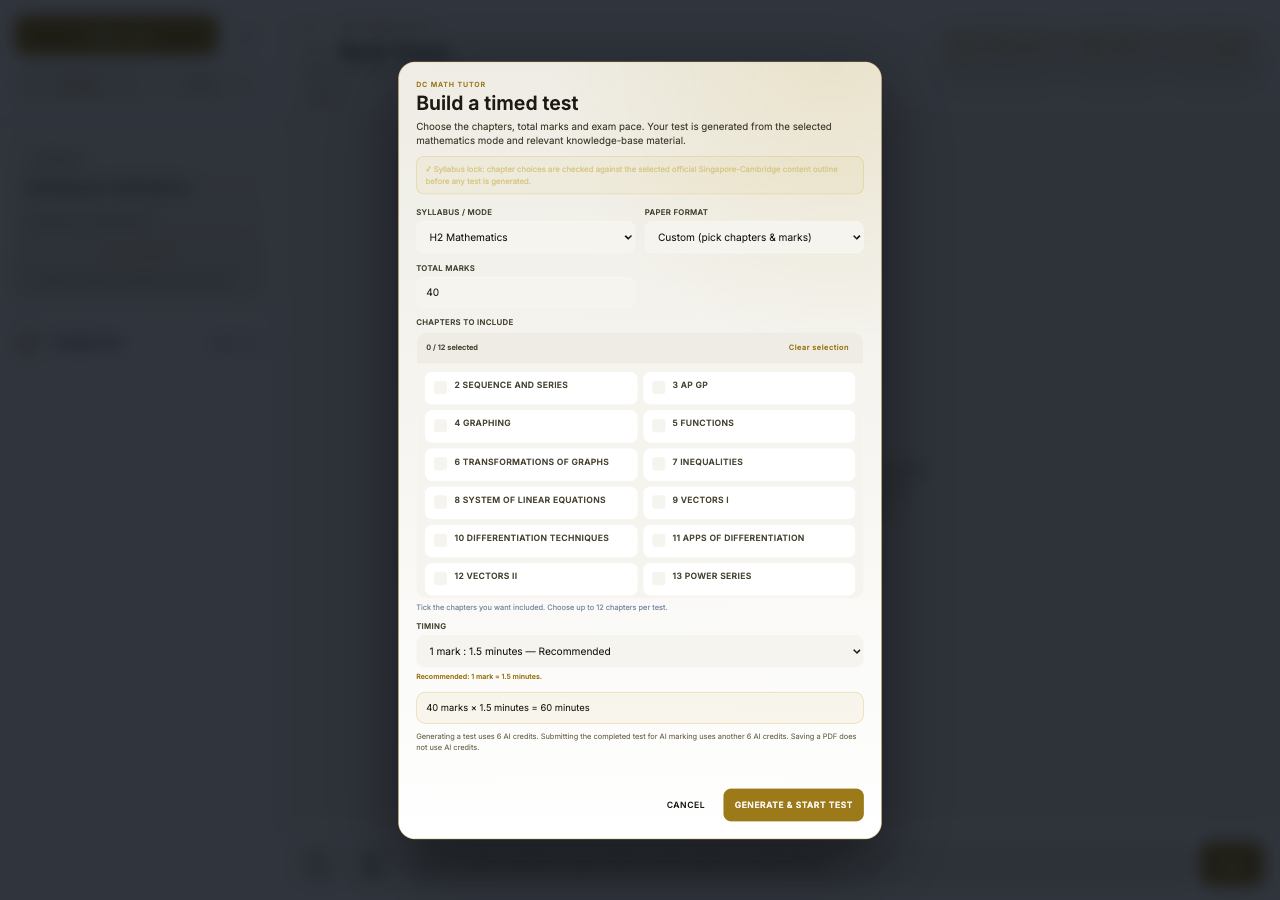
Teacher Workspace brings batch marking, assignments, question resources and class results into the same mathematics-focused interface.
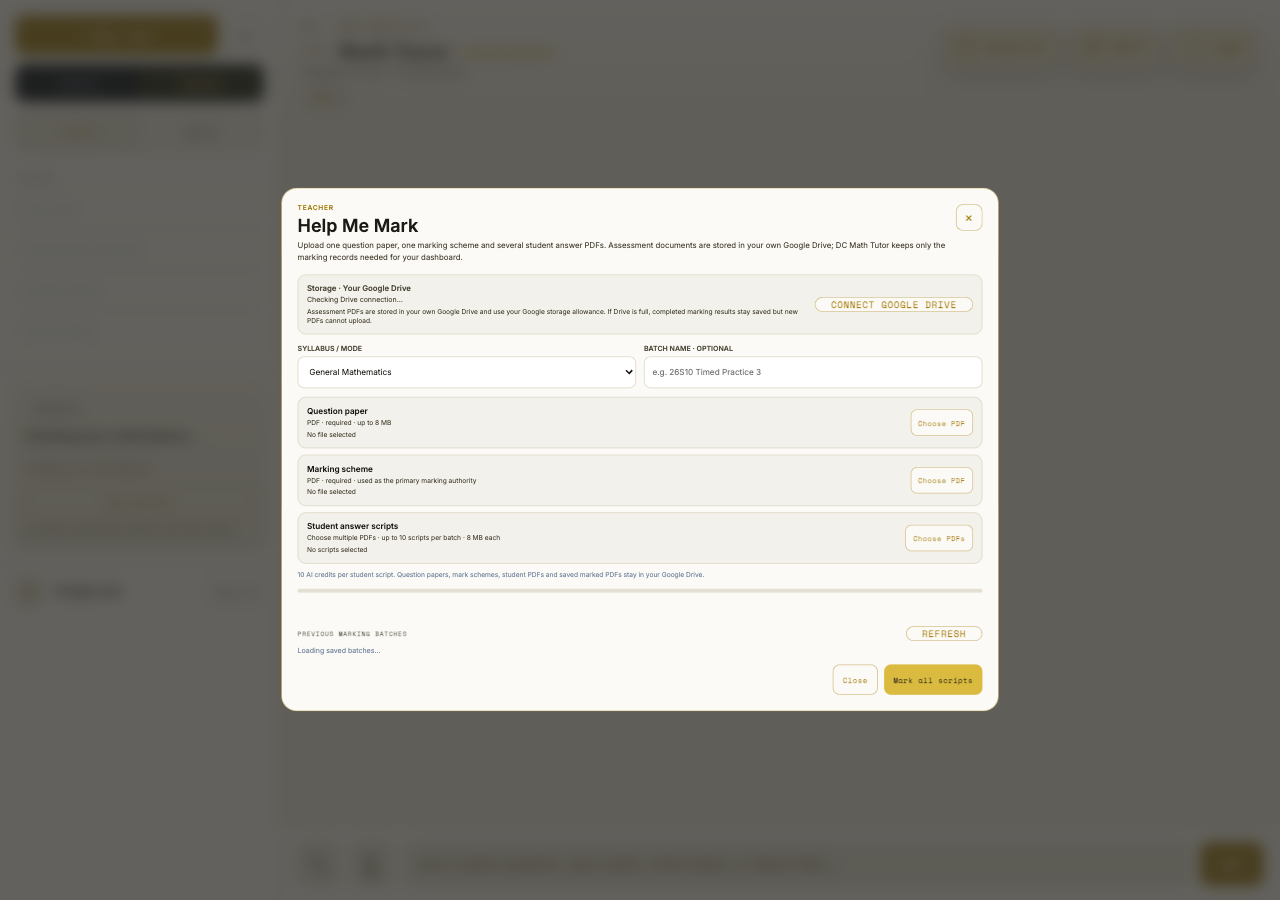
Upload the assessment materials once, then review multiple answer PDFs and save marked copies to your Google Drive.
Assign a Concept Check or Timed Test through Google Classroom or a controlled share link.
Compare performance by question and topic, identify each student’s weak areas, and export a CSV with question scores, totals, percentages and student review links.
Create questions, import from PDFs, review drafts and share copies with approved teachers.
Assessment PDFs and saved marked work use the teacher’s connected Google Drive storage.
Request access by email, then join the same saved conversation after the student approves. Teacher, student and AI messages stay clearly labelled.
Mark My PDF accepts a completed answer script and can use the original question paper and official marking scheme for more reliable marking. Feedback stays connected to the pages where the work was done.
Try Mark My PDF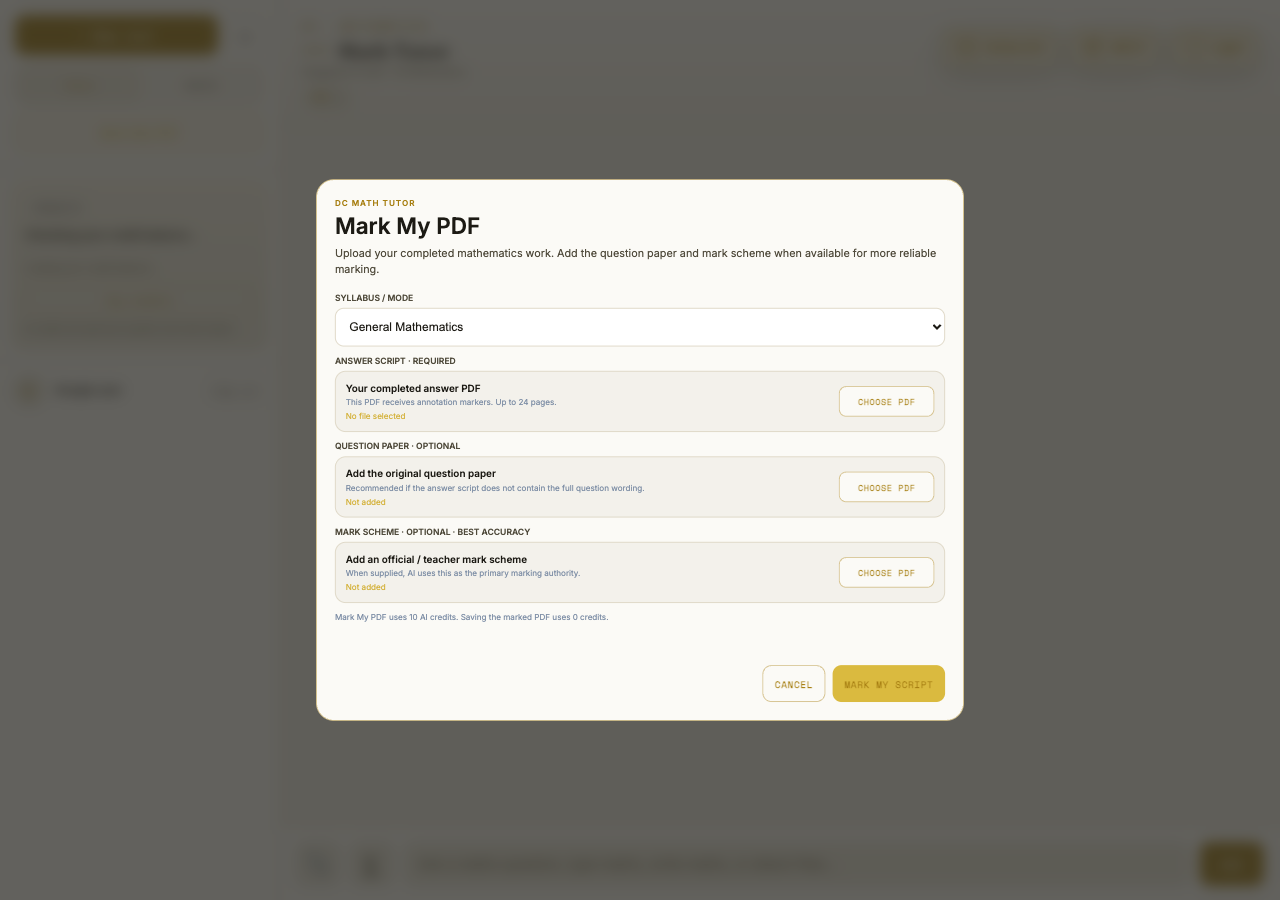
Supported notes and teacher assessment files stay in the connected Google Drive account.
AI actions use transparent credit amounts; saving and organising your own work does not consume credits.
Switch between General, H1, H2, Further Mathematics and H3 modes as your work requires.
Every eligible account begins with 20 one-time starter credits. Credits never expire, and the app shows the cost before you begin a larger AI task.
Ask questions and try the learning tools with the starter balance included with your account.
Saving, printing, organising notes, replaying a generated lesson and reviewing completed work do not use additional AI credits.
Web prices are shown in Singapore dollars. App-store pricing may vary by platform. Referral bonuses can add more credits to eligible accounts.
Short answers about syllabuses, credits, marking, storage and installing Integrand.
Integrand supports H1 Mathematics, H2 Mathematics, Further Mathematics and H3 Mathematics modes. The public learning-guide library is growing progressively, so not every syllabus has a published guide yet.
Yes. A new eligible account starts with 20 AI credits. You can explore the workspace and see the credit cost of an AI task before using it.
AI-generated tutoring, tests, concept checks, video lessons and marking use credits. The amount depends on the task and is shown in the app. Saving, organising and printing your own work do not use AI credits.
Yes. Approved teachers can batch-mark scripts, annotate with a stylus, adjust marks and add feedback. AI marking is an assistive first pass; the teacher remains in control of the final review.
Supported uploads and saved work use the connected user’s Google Drive where the feature allows it. Integrand retains the service records needed to operate accounts, conversations and credits, as explained in the Privacy Policy.
Yes. Use the Install Integrand button for device-specific instructions. On iPhone and iPad, add it through Safari’s Share menu; supported Android browsers can install it from the browser prompt or menu.
Open it in your browser or add it to your Home Screen for one-tap access.
 DC MATH APP
Keep the tutor one tap away and open it without browser controls.
Send feedback or describe a problem. Your message receives a support ID so it is easy to follow up.